Zine Scene: eight-page zines, made as web tiles
A zine is a little magazine you make yourself. Typically one sheet of paper folded into eight small pages to make a cover, six pages inside, and a back. People fill them with photos, drawings, lists, poems, show reviews, whatever they love, then photocopy a stack and hand them out at shows, swap them by mail, or leave them on a café counter. Nobody approves them, and there are no rules about what goes in.
The Web Tile Foundry now makes zines too. The new tile type is called Zine Scene: eight pages, made in your browser and published as a Web Tile in your own atproto repo, ready to share anywhere Web Tiles show up.
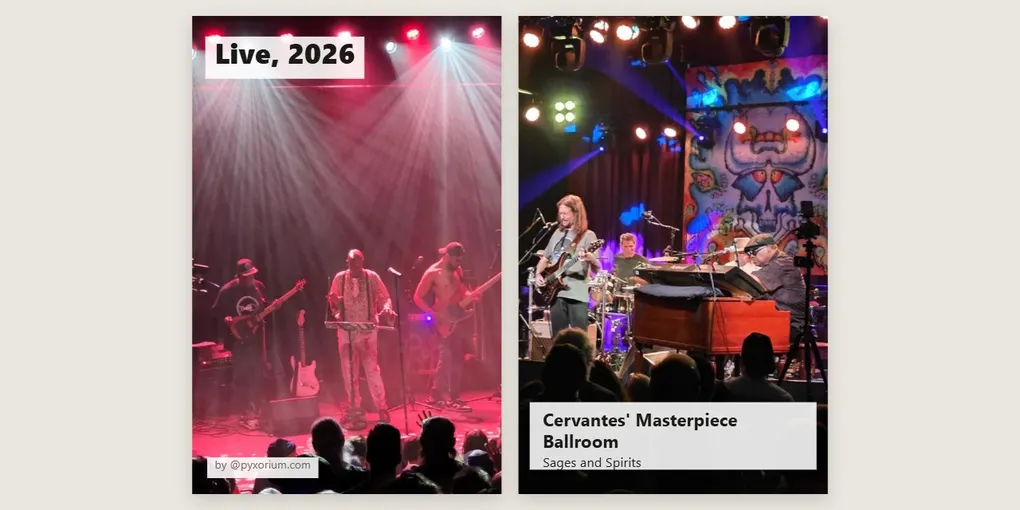
Live, 2026
Here’s mine, about some of my favorite music.
Open it and turn the pages with the arrows, a swipe, or the arrow keys. Much of it is photos from shows I went to this year: Fishbone at the Bluebird Theater on the cover, Sages and Spirits at Cervantes’ Masterpiece Ballroom, White Rose Motor Oil at the Skylark Lounge, Tame Impala in Toronto, and The Wailers at Levitt Pavilion on the back.
Some pages are interactive. The Cervantes page has a minute of “Wharf Rat” cut from one of my plyr.fm uploads; tap ▶ to hear it. Page 4 is a cassette: my Wednesday Morning Mix tape from the Foundry’s Mixtape C60 type, with a clip of “No Expectations” and a link to play the whole tape.
Other pages come from other atproto apps I use. Page 6 is a book from my Bookhive shelf, Grateful Dead: The Illustrated Trip, with its cover and stars. And on the back page, my rpg.actor character walks along the bottom. Tap it and it waves.
At the end, the Credits button lists every app something came from, and which pages it’s on.
What a zine can hold
Pictures. Any page can have a picture, edge to edge or beside your words, with a crop and zoom to frame it. Pictures come from your computer, or from your own atproto apps:
- Grain photos, one at a time, or a whole gallery at once: “Use this whole gallery” puts the first photo on the cover, the last on the back, and the rest on the pages between, each with its alt text as the heading.
- PinkSea drawings.
Alt text comes along with the picture, so your zine describes its pictures for people who can’t see them. Pictures marked sensitive in their app stay blurred until you choose them.
Words. Each page has a layout: picture and words, words over a picture, words alone, or a big quote with who said it. The Foundry shows how full each page is as you type, so nothing gets cut off.
Sound. A clip of up to a minute from one of your plyr.fm uploads, cut with handles on a waveform, on any page. Readers tap ▶, and it keeps playing as they turn the pages. The clip is a copy in your zine, so it stays even if you later delete the song from plyr.fm.
Your other apps.
- A book from your Bookhive shelf: its cover, title, author, stars, and a line from your review.
- A web tile or a mixtape you made in the Foundry, shown on the page with a link to open it.
- Your sprite from rpg.actor, walking along the bottom of any page you choose.
If you have more than one atproto account, your tiles and tapes from all of them show up to choose from.
Stickers. Stars, hearts, arrows, speech bubbles, music notes, a strip of tape, a NEW! burst and more, placed and turned by hand.
Looks. Clean (white pages, photos in full color), Photocopy (grainy black and white with typewriter headings), Collage (photos tilted and taped on cream paper, cut-paper headings), or Riso (two bright inks, with six ink pairs to choose from). The look changes how the zine is shown, never your pictures themselves. Letter or A4 paper.
Credits. Everything that came from another app is credited on the back page’s Credits sheet, with a link back to the app.
Part 1: Make a zine
Sign in. Go to foundry.thunderbird.cafe, sign in with your atproto account (a Bluesky account works), and pick Zine Scene.
Set it up. Give it a title, then pick the paper and the look. You can change the look at any time; the pages follow.
Fill the pages. Pick a page along the strip at the top (C, 1 to 6, B), choose its layout, and add a picture, words, a sound, stickers, or your sprite. To start from a Grain gallery, choose a picture, pick From Grain, and use Use this whole gallery; you can untick photos you don’t want.
Read it before you publish. The preview is the zine as readers will see it, pages and all.
Publish. If your zine has plyr.fm clips, tick the box confirming they’re your own uploads. Press Publish, and the zine goes into your repo with a card picture for its link preview, ready to share on Bluesky or anywhere else.
A zine can hold up to 20 MB of pictures and sound. It works best on a computer.
Part 2: Notes for builders
Copies, not links. Everything on a page lives inside the tile: pictures, covers, sound clips, your sprite. A zine still reads the same if a photo is later deleted from Grain. Only your own content goes in, from accounts you’ve signed in to, so copying is yours to do.
Check what you copy. Each picture or cover is downloaded from your own account’s server and checked against the content address (CID) in its record before it goes in.
A recipe travels with the zine. Every zine carries a public /foundry.json: its pages, layouts, words, and for anything that came from another app, that record’s at:// address and CID. The Credits sheet is built from it, and so could other readers.
Measure, don’t guess. How many words fit on a page depends on the layout, the look, the paper, and what else is on the page. Those limits were measured in a real browser across the combinations, rather than estimated, and a book page shrinks its cover step by step when it needs the room.
One page, no build step. The zine’s reader is a single page with its own script, so a zine has no dependencies to load beyond its own files.
What’s next
- Print and fold: print your zine on one sheet of paper and fold it into a real eight-page booklet.
- More apps: blog posts from WhiteWind or Leaflet, photos and short video clips from your own Bluesky posts.
If you make a zine, please consider sharing!
Further reading
- Web Tile Foundry, and its code at pyxorium/web-tile-foundry
- The apps a zine can draw from: Grain, PinkSea, Bookhive, plyr.fm, rpg.actor
- Mixtape C60: Your plyr.fm songs on a cassette Web Tile
- The Web Tile Foundry: Mint your own Web Tiles, the first post about the Foundry
- DASL: Web Tiles specification