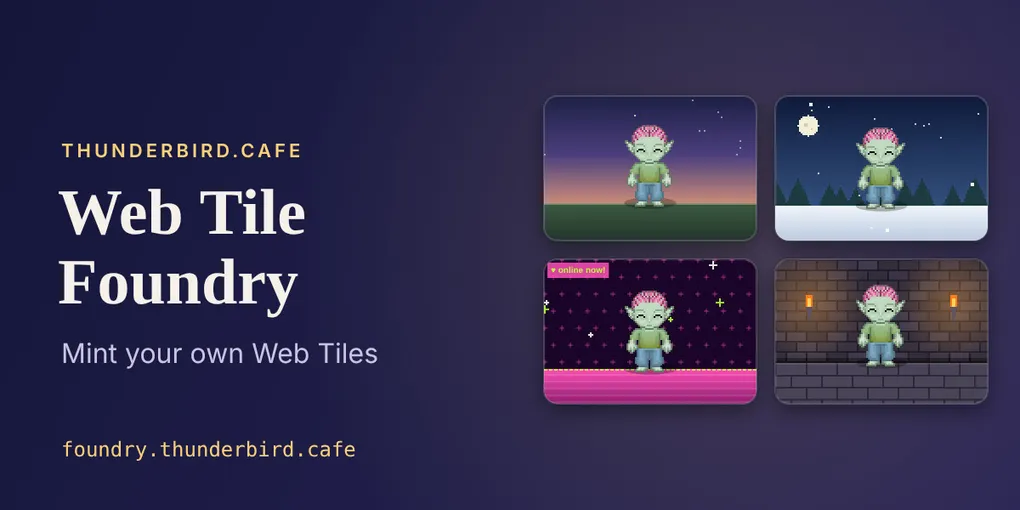
The Web Tile Foundry: Mint your own Web Tiles
Until now, every Web Tile on this site was made by hand: build the files, work out their addresses, write the record, check it all arrived. The Web Tile Foundry turns that into three steps anyone can follow. You sign in, make your tile, and publish it. The tile lands in your own atproto repo, under your own account, and it’s yours to share.
The first kind of tile the Foundry makes is a Sprite Walker: your rpg.actor character, out for a walk in a little scene of your choosing. Here’s mine.
Loading tile…
The gear in the corner lets whoever is watching change how the character moves: no motion, walking forward, or back and forth.
This post has two halves. The first is for anyone who wants to make a tile. The second is for people building atproto apps, with what I learned making this one. At the end there’s a short note on why Web Tiles are worth the trouble.
Part 1: Make your own tile
You need two things: an atproto account (a Bluesky account is one) and a character sprite from rpg.actor. If you haven’t made a character yet, do that first; it only takes a few minutes.
Sign in. Go to foundry.thunderbird.cafe and start typing your handle. Suggestions appear as you type; pick yours, or finish typing it, and press Sign in. You’ll be sent to your own server’s sign-in page to approve.
That approval screen is worth a moment’s attention. The Foundry asks for exactly two things: permission to publish Web Tile records to your repo, and permission to upload the files a tile is made of. Signing in allows foundry.thunderbird.cafe to publish Web Tile changes to your repo. The Foundry doesn’t touch your posts, likes, follows or anything else.
Make your tile. Once you’re back, the Foundry finds your rpg.actor sprite on its own. Choose a background from the eight on offer: Twilight lawn, Glitter profile, Block world, Dungeon floor, Café corner, Snowy night, Beach day, or Plain colour. A live preview shows your character walking in it.
Then give the tile a title, and a description if you like. These are what people see in the link preview card when the tile shows up in a feed or a gallery.
Publish. Press Publish my tile, confirm, and watch three steps tick by: uploading your tile’s files, adding the tile to your account, and checking everything arrived safely. When it’s done you’ll see your tile’s link and its address, each with a button to copy it.
Share it. There are a few easy ways to show your tile off.
On Bluesky. Copy the share link and paste it into a post. Anyone who opens it sees your tile running on webtil.es, the Web Tiles viewer.
On your twinkl.social page. twinkl.social home pages can show Web Tiles directly. Copy your tile’s address (the one that starts with at://), then:
- Go to my page, then customize page.
- Paste the at:// address and press + web tile.
- Pick a size.
- Optionally, use the pencil to turn on auto-activate on load, so your character starts walking as soon as the page opens.
- Save, then save ♡ to keep the page.
On an Astro site. If your site has a WebTile component, like this one does, the success screen has a ready-made snippet tucked under Embed on an Astro site.
You can make as many tiles as you like. Each one is a separate record in your repo, so a tile in the snow and a tile on the beach can live side by side.
Part 2: Notes for builders
The Foundry is a small static site: no server of its own, just a browser app that signs you in with atproto OAuth and writes records straight to your PDS. The code is public at pyxorium/web-tile-foundry for reading, though it carries no licence, so treat it as a worked example rather than a library. Here’s what I’d tell anyone building something similar.
Ask for the smallest permission that works. atproto’s granular permissions let an app ask for write access to one record type instead of the whole account. The Foundry’s scope is atproto repo:ing.dasl.masl blob:*/*: Web Tile records, and file uploads, and nothing else. It’s a better promise to make to people, and the consent screen shows it.
Pick your app’s address once. With atproto OAuth, a browser app is identified by the URL of its metadata file, and sign-in screens show that URL in full. Keep it short and readable (the Foundry’s is foundry.thunderbird.cafe/oauth.json), and settle it early: changing it later signs everyone out.
For local development, use 127.0.0.1. atproto’s localhost client mode lets you test sign-in without hosting anything, but the page has to be opened at http://127.0.0.1, not at localhost.
Restore the session once per page load. React’s development mode runs start-up code twice. If both runs try to restore the OAuth session, they trip over each other and you come back from sign-in looking signed out. One shared promise fixes it.
One content type per kind of file. A PDS stores identical bytes once, and the content type of the first upload sticks. Upload the same bytes later under a different type and you get an InvalidMimeType error. The Foundry uses one fixed type per kind of file, and recovers once if the server reports a mismatch.
Compute addresses yourself, then check. Every file in a tile is named by its content address (a CID), and the tile’s manifest has an address of its own. The Foundry computes them all in the browser before uploading, compares them with what the server reports, and reads the record back after writing it. The tests check the code against addresses taken from real, live records.
Make tiles truly self-contained. A tile can’t fetch anything once it’s loaded, so the sprite sheet is inlined in the page, and only the chosen background’s drawing code goes in. Every tile carries the standard security policy, and the build refuses a page without it.
Put the recipe in the tile. Each tile includes a small public file recording which tile type, which version, and which choices made it. The same choices always produce the same bytes, which makes tiles reproducible and opens the door to editing later.
Size the card art for the loader. The tile loader shows a tile’s first screenshot in a 16:9 box and its first icon at 48 pixels square. A 1280 by 720 banner and a 256 pixel icon look right at those sizes.
Leave room for more tile types. The Sprite Walker is one folder that follows a small contract: what inputs it needs, how to build its files, how to draw its card. The rest of the app doesn’t know anything about sprites. Adding a new kind of tile means adding a folder; the tile-type picker appears on its own once there’s more than one.
Name your trade-offs. The handle suggestions come from a community search service, typeahead.waow.tech, the same one the Cosmic Junkyard demo uses. It’s only used for suggestions, and sign-in goes through the normal channels whatever you pick, but what you type is sent to that service. That belongs in the README, so it’s there.
Part 3: Why tiles
Robin Berjon’s founding essay on Web Tiles defines a tile as “a set of content-addressed Web resources that, once loaded, cannot communicate further with the network.” That one rule does a lot of work. A tile can’t phone home, can’t track who’s watching, and can’t change under you, because its address is a fingerprint of its contents. You can put one in a post or on a page without having to trust whoever made it.
The Foundry adds the other half: the tile belongs to you. It’s minted from something that’s already yours (your rpg.actor character), written to your own repo, and shown wherever you choose to show it, on Bluesky, on twinkl.social, on your own site. No platform holds it for you.
Berjon closes his essay by arguing that composing things on the user’s side, rather than the server’s, “significantly increases user agency and shifts power from servers to people.” A walking pixel character is a small thing. But it’s a small thing you made, that lives in your repo, and that nobody can quietly take back or change. That seems like the right place to start.
Further reading
- Web Tile Foundry, and its code at pyxorium/web-tile-foundry
- rpg.actor, where the characters come from
- DASL: Web Tiles specification
- Web Tiles, by Robin Berjon
- The Web Is For User Agency, Robin Berjon
- webtil.es, a public tile browser and quickstart tutorial
- @dasl/tiles, the monorepo covering
tile-server,tile-loader, and related packages - Twinkl’s tile isolation architecture (AGENTS.md)
- atproto permissions and atproto OAuth, the specs behind the Foundry’s sign-in