
Rooms: sharing web tiles inside a browser
Rooms are a new kind of tab in Raku, a browser for web tiles: voice, one shared screen, and tiles opened for everyone. They’re for small meetups, for example 2 to 6 people, like a demo night where someone shows how they made a tile and then opens it for everyone to try.
That last part is the point. On an ordinary video call, a presenter shares a picture of their screen, and everyone else watches. In a room, a tile opened for everyone runs on every computer, so each person gets their own copy to click, drag and interact with. Some tiles go further and keep their copies in step: a live poll where everyone votes together, and every screen shows the same count.
A room in Raku
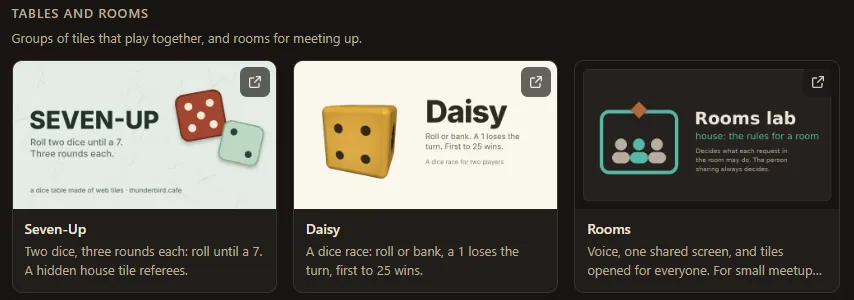
On Raku’s first screen, the Tables and rooms row has a Rooms card. Open it and you get a room tab: start a new room, or paste an invite.
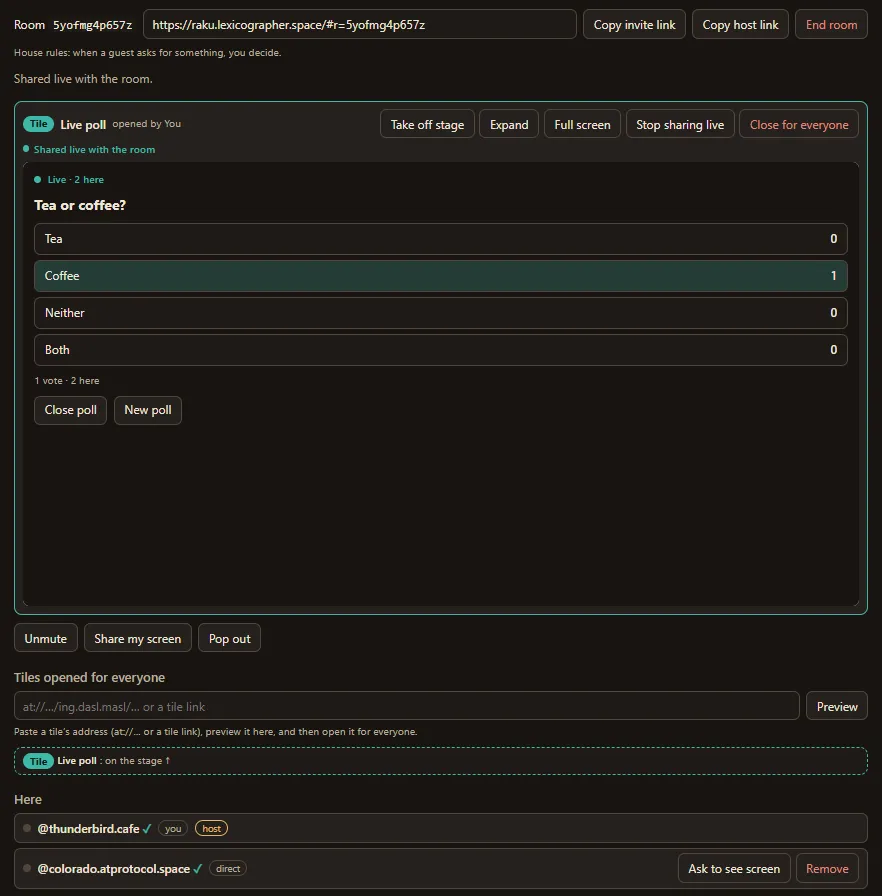
Inviting people. The person who starts a room is its host. The room has two links: Copy invite link, which you send to your guests, and Copy host link, which you keep, in case you need to come back as host from another computer. Send the invite however you like: a message, a DM, an email. Anyone with the link can ask to come in, so share it only with the people you’re meeting.
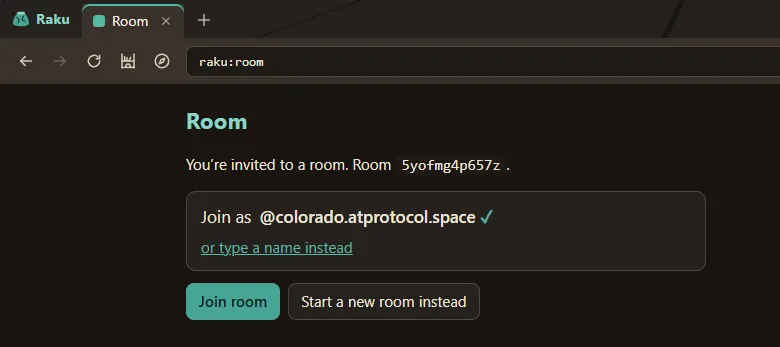
Joining. Opening an invite brings you to the room’s join screen. If you’re signed in to Raku, it offers to join as your handle, with a check mark, because Raku has confirmed the account is yours. If you’d rather not sign in, type a name instead. A typed name works just as well in the room; it simply doesn’t get the check mark. The first time you join with your account, Raku asks once for the “Rooms” permission, which lets it show your handle in a room and nothing else.
Your mic starts off. Unmute when you want to talk. Raku asks for your microphone the first time you unmute, and for your screen only when you choose to share it.
The stage
A room has one stage, and it holds one thing at a time: someone’s shared screen, or a tile.
Sharing a screen. Click Share my screen and your browser asks which tab, window or screen to share. A guest who wants to see someone else’s screen can ask, and the person whose screen it is always decides. Nobody’s screen is shared without them choosing it in their own browser.
A tile on the stage. A tile opened for everyone can go on the stage, where it gets the room’s width and stays live for everyone. Below the stage are the mic and screen buttons, the list of tiles opened for everyone, and Here, the people in the room. A small tag beside each person says how your computer reaches theirs: direct, or via relay when a network needs help.
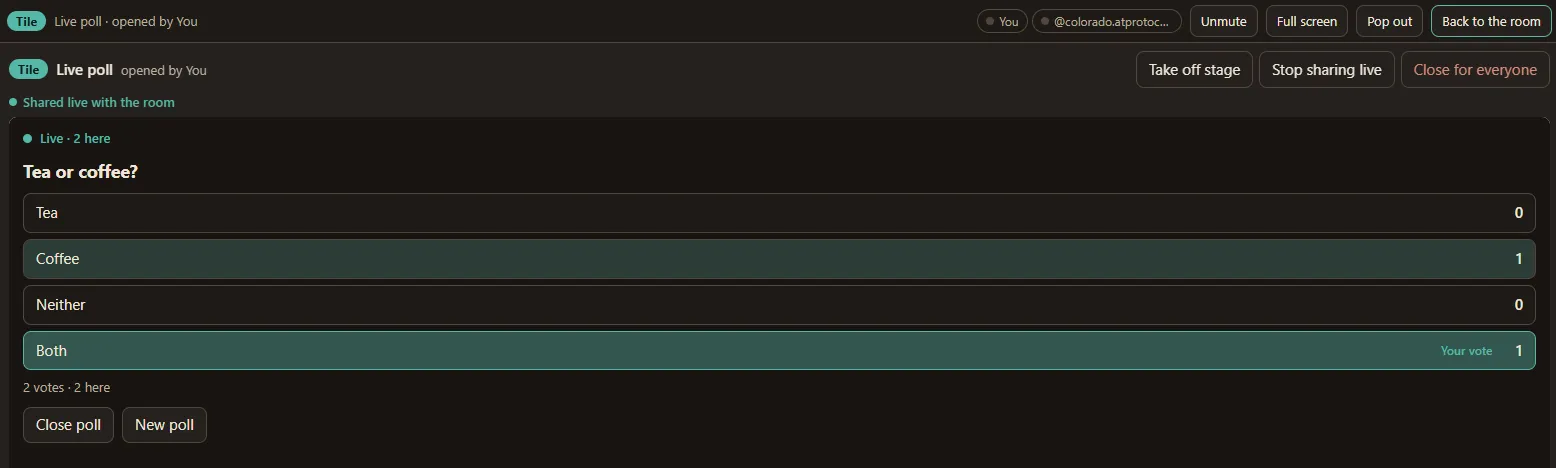
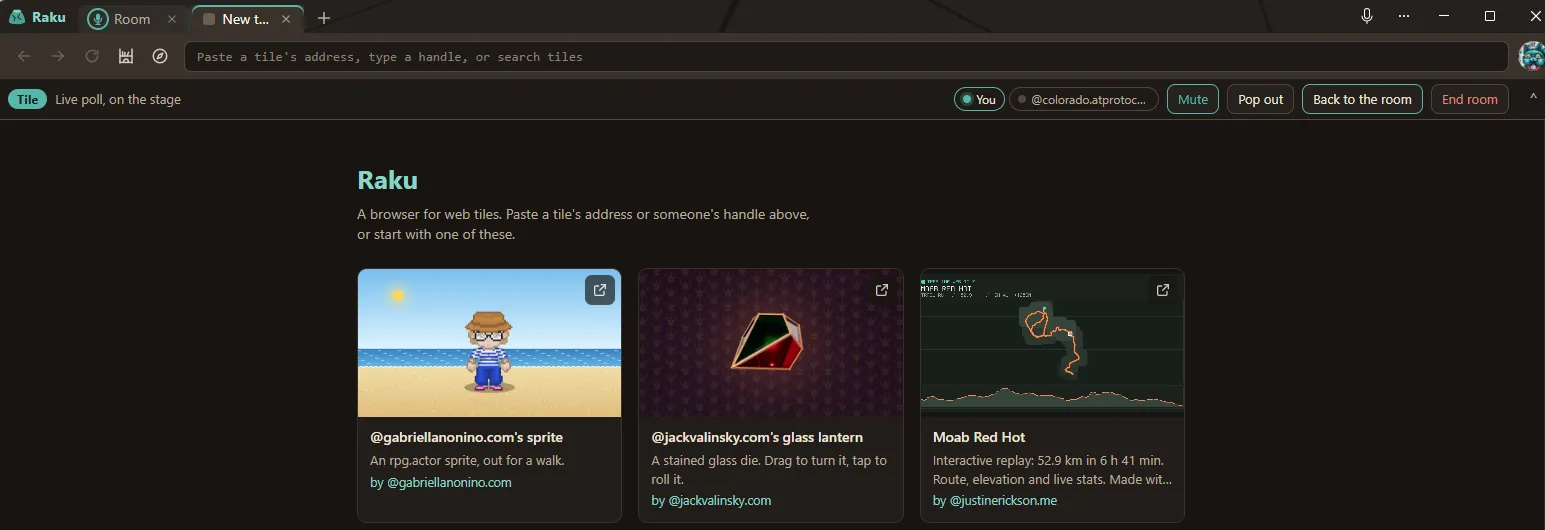
Expand. When you want the stage and nothing else, click Expand. The tile or screen fills the room tab, and the room shrinks to a thin bar across the top: who’s here, Unmute, Full screen, Pop out, and Back to the room. Expand is each person’s own choice; the host can’t make it for you. If the stage changes while you’re expanded, you follow it, and when the stage is emptied you’re back in the room.
The call bar. A room keeps going while you look at something else. Switch to another Raku tab and a call bar appears just under the address box: what’s on the stage, who’s talking, your mic button, Pop out, Back to the room, and Leave (End room, for the host). When a guest asks for something, or someone asks to see your screen, the bar opens again by itself so you don’t miss it. On a phone, the bar sits at the bottom of the screen.
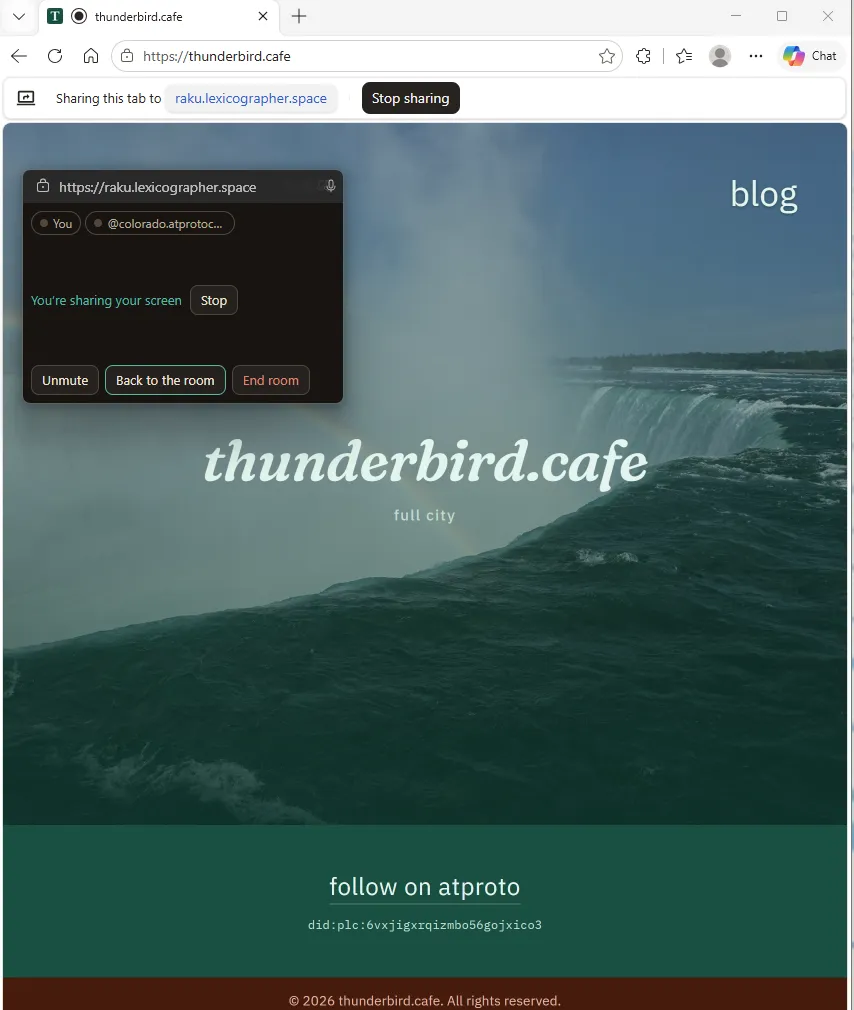
Pop out. Sometimes the thing you’re showing isn’t in Raku at all: a slide deck, a code editor, a page in another browser. Pop out turns the room into a small window that floats on top of every other program, so you can keep an eye on the room and keep your hand on the mute button while you present. While someone else shares a screen, the floating window shows it; while you share yours, it says so, with a Stop button. Pop out needs a browser that supports floating windows, which today means Chrome and Edge on a computer.
Tiles opened for everyone
Paste a tile’s address into the box under the stage (an at:// address, a tile link, or a handle and record key), and Raku shows you a preview first, only on your own screen. When it looks right, open it for everyone. The host can do that straight away; a guest’s request goes to the host, who decides.
What gets sent to the room is only the tile’s address and the exact version you previewed. Every computer then fetches the tile itself from its author’s account, checks it against the same hide list Raku always uses, and runs it in its own sealed box. Nobody’s copy comes from the host’s computer, and a tile can’t reach anyone through the room that it couldn’t reach on its own.
Live tiles. Most tiles run as they always do: your copy is yours, and what you do in it stays on your screen. A live tile can also talk to its other copies in the room. The first one is a poll. Open it, write a question (or pick a ready-made one), click Start poll, then Share live with the room. Now every copy shows the same question, the votes come in on every screen at once, and anyone can change their vote.
You can open the poll on its own in Raku, outside a room. Alone, it’s a poll for one: it works, it just doesn’t have anyone to count.
The house tile: the room’s rules
Every room has a house: a small tile that holds the room’s rules. It runs hidden on the host’s computer, like the referee in Seven-Up. Whenever someone wants something in the room (to open a tile for everyone, to share one live, to show their screen, to see someone else’s), that request is a wish, and the house decides what happens to it: allow it, refuse it, or ask the host.
Today’s house has one simple rule set, which the host sees as “House rules: when a guest asks for something, you decide.” The host’s own requests go straight through; a guest’s go to the host as a small card to approve or decline.
One rule sits above every house: the person sharing always decides. A house can let a request go on to you, but it can never start a share. When someone asks to see your screen, you get the question, then your browser’s own picker, and you can say no at either step.
This is the same idea as the wishes in the first wishes post: a tile asks, and something outside the tile, with a person behind it, decides what answers. In a room the house is that something, and because the rules are a tile, a different room could use different ones.
Underneath
A relay that stores nothing. To find each other, the people in a room go through a small relay, relay.rooms.thunderbird.cafe. It introduces them and passes the room’s short messages: who’s here, what’s on the stage, which tile was opened. It keeps no record of any of it, and a room vanishes when the last person leaves. If the host drops out, the room waits about a minute for them to come back before it ends.
Voice, screens and live tiles go directly between computers, encrypted. That’s WebRTC, the same thing video calls in browsers use. Google’s and Cloudflare’s connection helpers help the computers find a route to each other. On networks that block direct connections, Cloudflare passes the call along, still encrypted, without being able to read it. That’s the “via relay” tag in the people list.
Signing in is a label, not a gate. It adds a check mark to your handle, so the others know it’s really you. It uses atproto’s own sign-in (OAuth): your account’s Authorize screen asks for one permission, “Rooms,” which confirms your identity. The permission can’t create, change or delete anything in your atproto account. Tiles in the room never see your account at all, only a random id. Or skip it: anyone with the invite link can join with just a typed name, no sign-in at all.
Nothing is recorded. No audio, no screens, no chat, no poll results are saved anywhere. When the room ends, it’s gone. Raku keeps the room you’re in for that one tab, so a reload offers a one-click Rejoin, and forgets it when the tab or window closes. All of this is listed on Raku’s About page.
For builders: how a live tile talks to its copies
The live poll is the worked example of a small protocol any tile can use. It’s described in full in the README of pyxorium/rooms-lab, in the section “Live tiles: how a tile talks to its other copies”. The short version:
A tile talks only to its page. As with every tile, the poll can’t reach the network. It sends its messages to the room page around it (Raku, here), and the page carries them.
The host’s page keeps the order. Every message from every copy goes to the host’s page, which numbers it and sends it to all the copies of that tile, including the sender’s own. Every copy sees every message in the same order, so they all reach the same state (what the poll holds in memory while it’s open; nothing is saved, and the tile itself never changes). For the poll, that means the same votes in the same order, and the same count on every screen.
Messages go only to copies of the same tile. Another tile in the same room, even another poll, hears nothing. The relay never sees what’s in them: live messages travel over the direct connections between computers.
Each copy has a random id. It’s made fresh for each person, tile and room, and isn’t the person’s id in the room, so a tile learns that “copy 3 voted”, not who is behind it.
There are limits. Messages are JSON, at most 16 KB, and each copy can send about ten a second, with short bursts allowed. The room as a whole has a budget too, and every receiving page checks that a message really came from the host’s page.
Newcomers catch up. When someone joins, their copy starts empty; the copies that have been live send what they know, and the new copy merges it in. When the host’s page reloads, live sharing pauses and then resumes.
One file to copy. live-talk.js, in the poll’s folder, is the part any tile can take: it says hello to the page, sends and receives, and, when nobody answers because the tile isn’t in a room, plays the room of one, sending your own messages straight back to you. That’s why the poll works on its own.
The tiles spec already expects copies of a tile to keep in sync one day. This is one try at what that could look like, borrowing its shape from webxdc, the format for small apps shared inside chats.
What’s next
Easier invites. Today the host copies the invite link and sends it by hand. We’ve sketched other ways in: an event page where people RSVP and get the link when the room opens, or a door that lets in a guest list.
More live tiles. The poll was the first; a live zine, where people turn the pages together, is a natural next one, and the protocol is there for anyone to use in their own tiles.
Come try it. Start your own room with a small group in Raku.
Further reading
- Raku, and its About page
- Raku: a browser for web tiles
- The rooms code and the live-tile protocol: pyxorium/rooms-lab
- Seven-Up: a referee tile between two player tiles
- Wishes: Creating Two Web Tiles that Talk to Each Other
- The Web Tile Foundry
- Web Tiles, by Robin Berjon
- DASL: Web Tiles specification