
Raku: a browser for web tiles
A web tile is a small page or app that someone publishes to their own atproto account. Because every tile is a record in someone’s account, together they make a layer across the network, the tile layer: pages anyone can publish and anyone can open, wherever their author’s data happens to live.
Raku is a browser for that layer. It opens tiles in tabs, keeps the ones you like on a shelf, and helps you find new ones. Every earlier post on this blog showed tiles inside the post. This is the first one about something you can simply open and use: open Raku →
You don’t need an account to browse. Signing in is only for saving your matches at the game tables, and for playing Daisy with someone on another computer.
The first screen
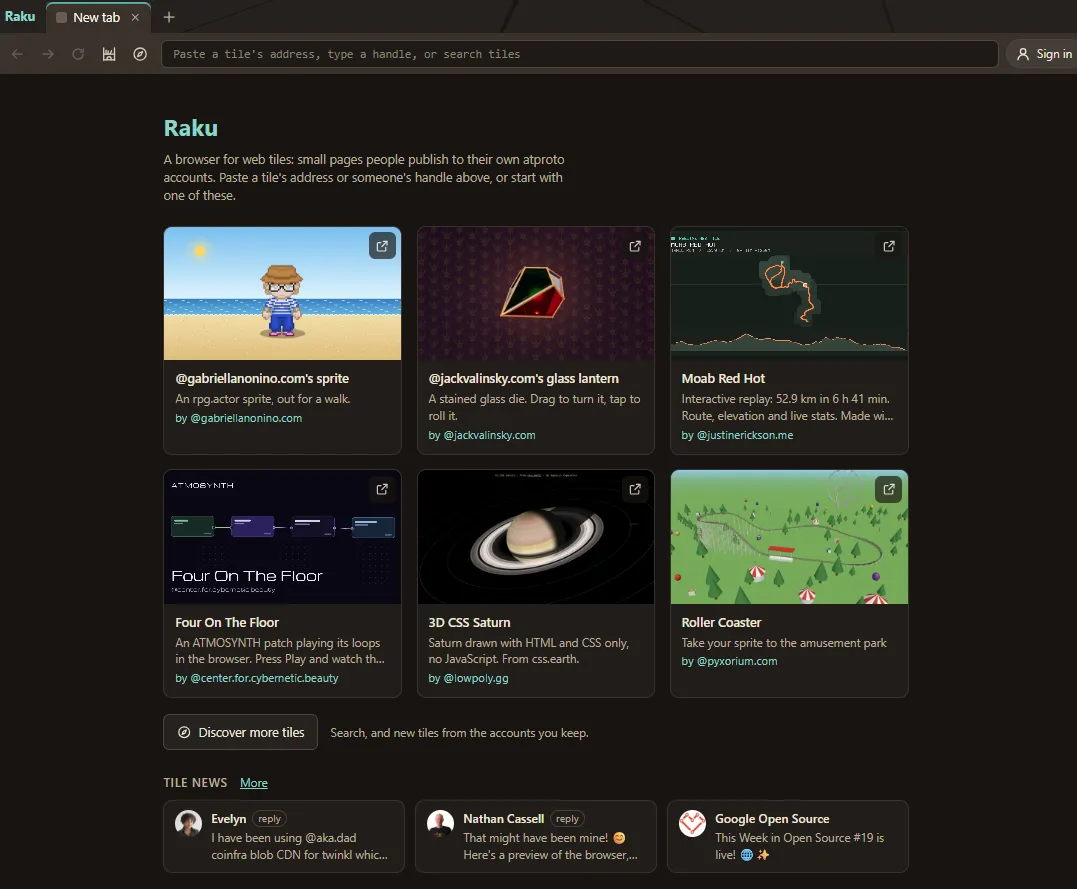
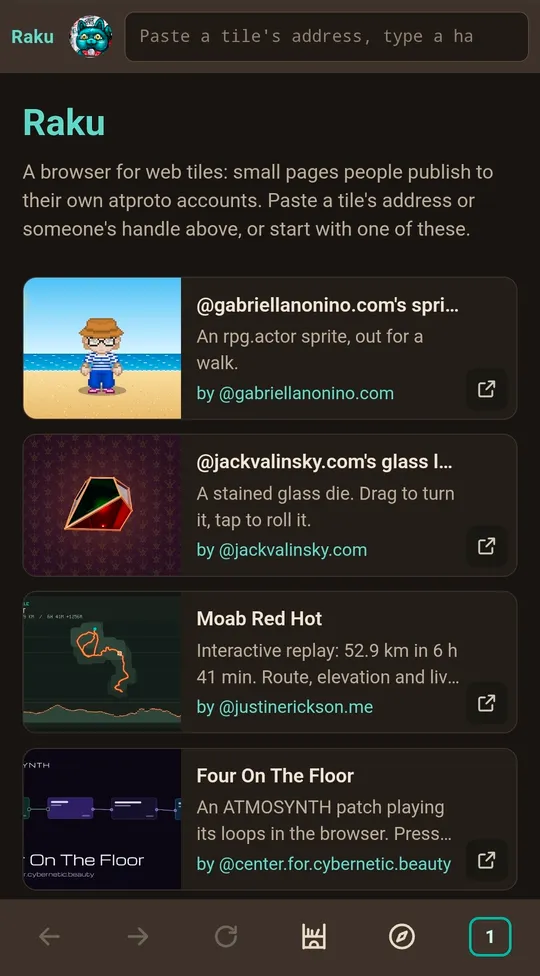
At the top is the address box: “Paste a tile’s address, type a handle, or search tiles.” Under it are six picks, tiles chosen to show the range of what people make: a sprite, a glass lantern, an activity route, a synth patch, a 3D CSS planet and a roller coaster. Click one and it opens in a tab.
Below the picks, a Tile news row shows the latest three posts about web tiles. The screen also has the Tables, groups of tiles that play together, and, once you’ve kept some, your most recently kept tiles. The last line says what Raku is careful about, and links to the About page: “About Raku: what it keeps, who it talks to →”.
Opening a tile
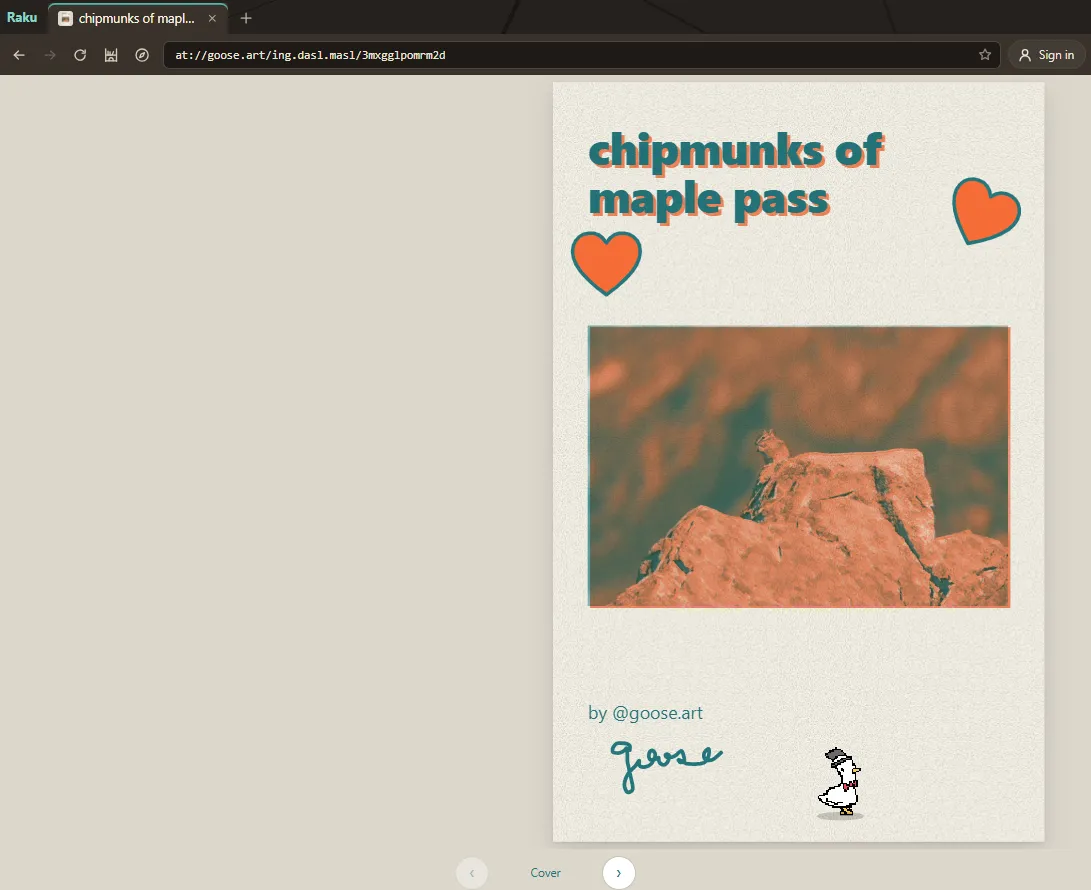
Anything that names a tile. The address box takes a tile’s at:// address, a tile link from lexicographer.space, appmosphe.re or webtil.es, or a handle. Type a handle and suggestions appear as you type, with avatars. Choose one and you see that account’s tiles as cards, read live from the account’s own server.
Posts open where you read posts. Paste a link to a Bluesky post and Raku shows a short message first: where the link goes, and an “Open in” choice. Bluesky is the default; Blacksky and Northsky are among the others. Raku remembers your choice. A tile linked from a post opens in Raku itself.
Each tile gets its own tab. Up to ten tiles can be open at once, and tabs in the background keep running. The open tabs live in the page’s own address, so a reload brings them back, and a copied link opens the same tabs for someone else.
The shelf. The star at the end of the address box keeps a tile, or a whole account, on your shelf. The shelf is kept in this browser only. Export saves it as a small file, and Import adds it in another browser.
Large tiles ask first. Raku reads a tile’s size from its record before loading anything. Above 25 MB it asks “Open anyway?”, and above 500 MB it refuses.
Messages. If a tile sends Raku a message, a Messages button appears on its tab and lists what it said. Most tiles never send one: they have nothing to ask. We’ll come back to this in the section on privacy.
Discover
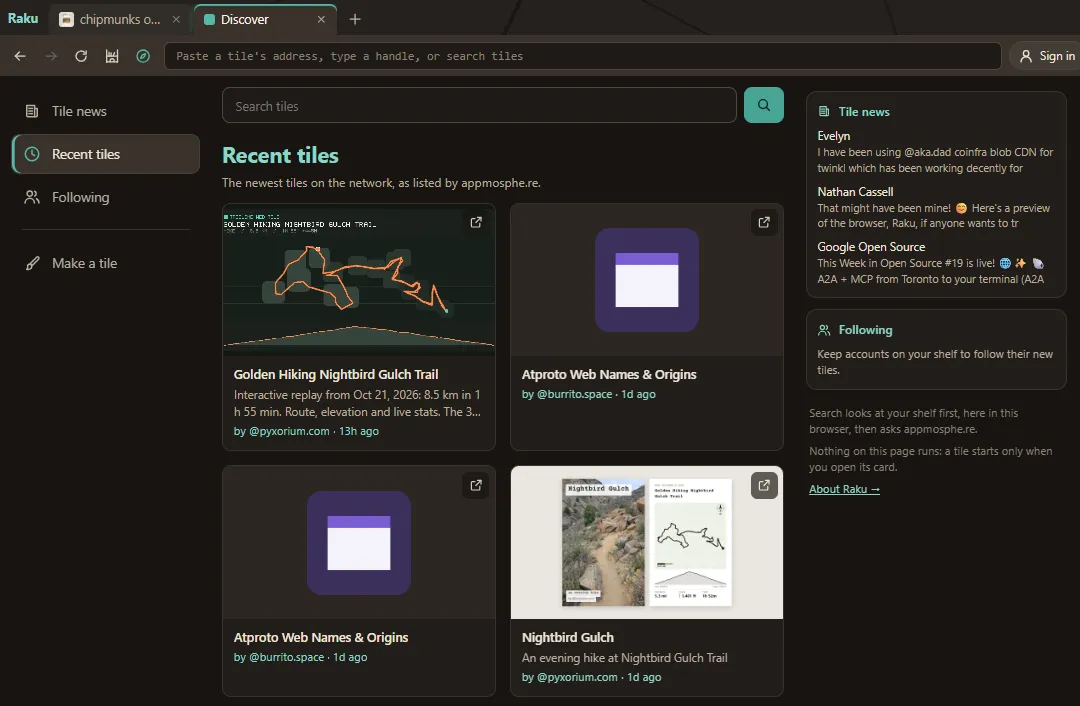
The compass button opens Discover: the places to find tiles on the left, the one you chose in the center, and a preview of the others on the right. On a phone, the places become a row of chips across the top. Nothing on Discover runs a tile. It’s all cards until you open one.
Tile news is posts about web tiles from the “Web Tiles” feed, a Bluesky custom feed made with Graze that you can also pin in Bluesky and other apps. Raku draws the posts itself, follows Bluesky’s moderation labels, and shows one card per thread, with a note like “+1 more reply in this thread”.
Following shows the newest tiles from the accounts on your shelf, all mixed together, with a quiet “New” on tiles made since your last visit.
Recent tiles is the newest tiles on the network, as listed by appmosphe.re, Robin Berjon’s tile directory. A “New” mark shows what appeared since you last looked, and More goes further back.
Search. Type words in the address box and press Enter, or use the box on Discover. Results come in two parts. “Already in Raku” is matched here in your browser, from your shelf, Following and the picks. “From appmosphe.re” comes from appmosphe.re’s search, which receives only the words you typed, and only when you press Enter. Here’s a search for “zine”.
Make a tile is for when you’d rather make one. It lists the tools people use today, in two groups:
- No code needed: ATMOSYNTH, for synth patches you play together live; Treeline, whose “Share as webtile” turns an outdoor activity and its GPS track into a tile; and the Web Tile Foundry, where you fill in a form for a walking sprite, a stained-glass lantern, a roller coaster, a mixtape or a zine.
- From your own files: appmosphe.re publish, for a folder with an index.html or a .tile file, and szzt by burrito.space, where you drag in a page, a folder or a .zip and see it run before you publish. szzt calls itself a testbed for the web tile specs.
Tables
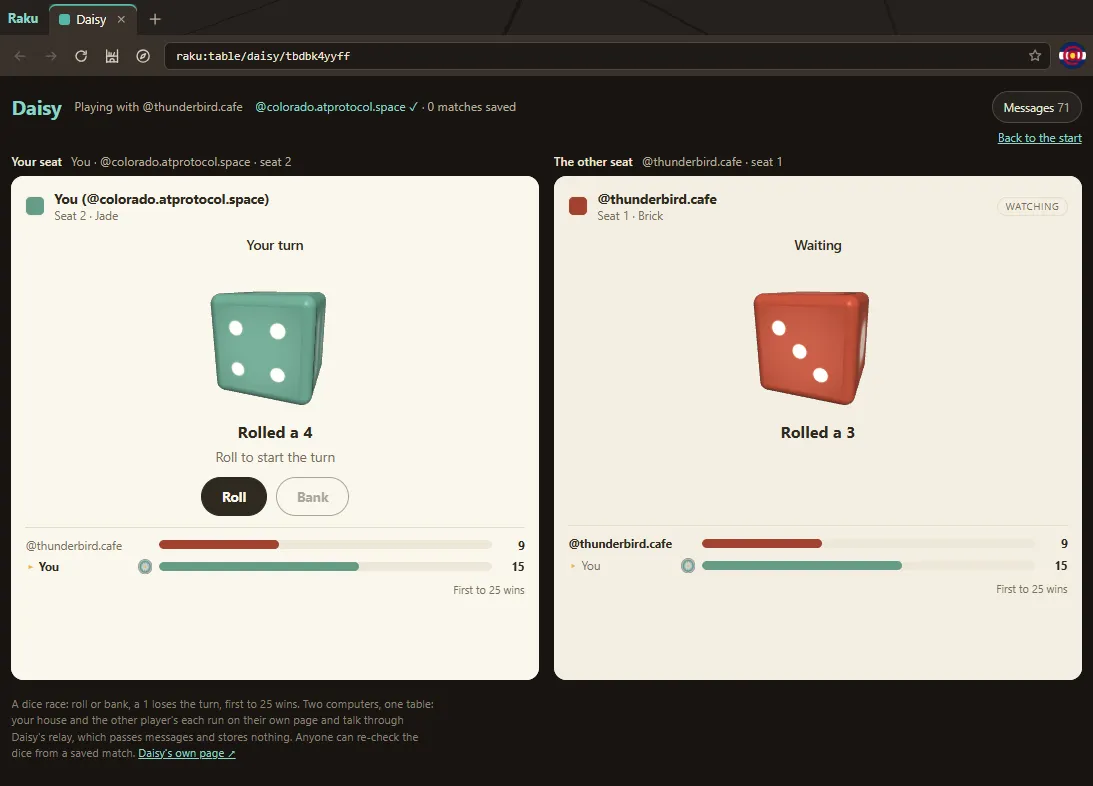
A table is a group of tiles that play together on one screen. Raku has two, the games from earlier posts: Seven-Up, where a house tile referees two player tiles, and Daisy, a dice race. You can play Daisy against the bot with no sign-in at all. A table loads only the exact tile versions Raku has approved, so a changed game is refused until it’s checked. The Messages button in the table’s bar lists everything passing between its tiles: the players asking the house, the house answering, and Raku in between.
Daisy across two computers. Open a table and Raku gives you a link to send. Your friend opens it, signs in and takes the other seat. Raku uses the same outside relay and the same house tile as the Daisy page, so a table opened in Raku can be joined from the Daisy page, and the other way round. Your seat is kept in this browser for a day, so a reload or a closed tab can come back to the match.
The lounge. Daisy’s start screen has the same lounge as the Daisy page: turn on Mingle to see who else is here right now, and to be seen. While you’re on another tab, Raku stays quietly connected. When someone arrives, the relay says only that someone did, never who, and Daisy’s tab glows turquoise.
Signing in, only for this. You sign in to save a match, to sit with someone at another computer, or to mingle. Each game asks for its own permission the first time, through the game’s permission set (“Play Seven-Up”, “Play Daisy”, “Daisy lounge”), so the Authorize screen shows the game’s own words. Raku’s promise sits beside every sign-in: it “doesn’t touch your posts, likes, follows or anything else.” The save prompt is Raku’s own, drawn outside the tiles, and only the house tile’s result is saved, to your own repo.
What Raku keeps, and who it talks to
An ordinary web page can load a picture from anywhere, and that picture can tell its server you looked. A tile can’t. That’s the promise of the tile layer, and most of what Raku does is keep it.
Each tile is a sealed box. Every tile runs on its own address, apart from Raku and from other tiles, so it can’t read your shelf, your sign-in, or another tile. It can’t reach the internet on its own: no fetching, no pictures from elsewhere, no tracking pixels. What it shows comes from its author’s account. It can talk only to Raku, and anything it says shows in its tab’s Messages.
Raku talks to a short list of servers, by name. Each tile’s own account, for the tile and its pictures. Bluesky’s public servers, for moderation labels, Tile news posts and profile pictures. plc.directory, to find which server holds an account. appmosphe.re, only when you search, for the Recent tiles list, and for pictures of the picks, Recent tiles and search results. lexicographer.space, for a coded copy of its hide list, which Raku checks here in your browser so nobody learns which tiles you open. typeahead.waow.tech, for handle suggestions while you type. The tile loading server, which gives each tile its own address to run on. And Daisy’s relay, only while you play Daisy with someone on another computer.
What stays in this browser. Raku has no server of its own and no accounts of its own. Your shelf, your last visits to Following and Recent tiles, the app you chose for posts, the accounts you’ve signed in with, and a Daisy seat for a day are kept in this browser, and nowhere else. Clearing the site’s data clears them.
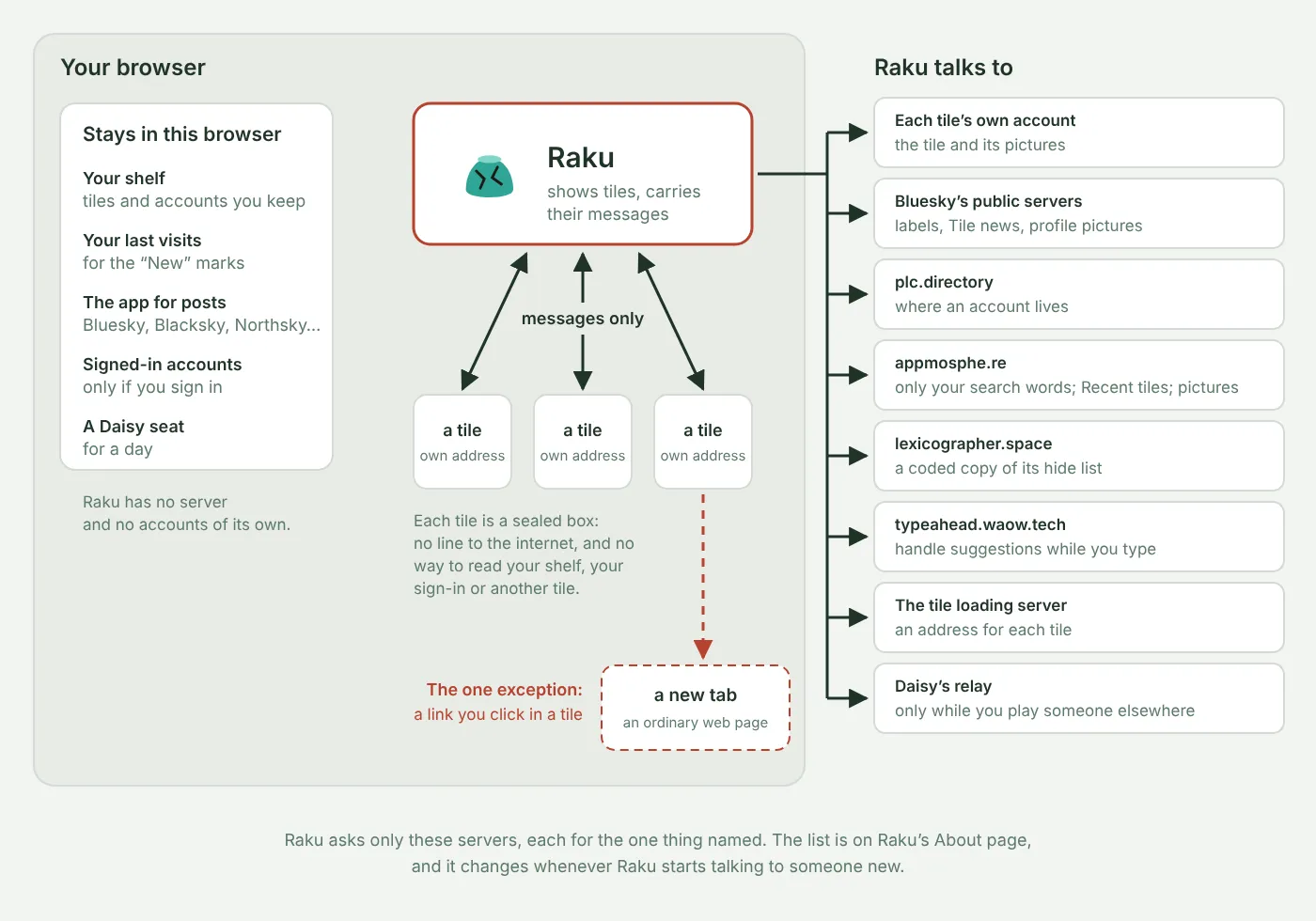
One exception. A tile can open a link in a new tab when you click it, and that link could carry information about what you did in the tile. It’s the same as clicking a link on any web page, so use the same care.
Hidden tiles. Raku hides tiles and accounts on lexicographer.space’s hide list, and accounts that Bluesky’s moderation hides. To report a tile, see Reporting and takedowns. All of this is on Raku’s own About page, which changes whenever Raku starts talking to someone new.
Tiles working together
A single tile needs no work to appear in Raku: anyone’s tile opens, because a tile describes itself completely. Tables are different. Each is several tiles on one screen, and Raku does the wiring: it passes messages between the house and the players by fixed rules, connects to the relay, and holds the sign-in. In the earlier posts, the page did that job; in Raku, Raku is the carrier for every table. (The Daisy post’s table shows where each job has lived so far.)
Bringing a group of tiles into a browser still takes real work, because nothing yet lets a group say which tiles belong together and what may pass between them. That knowledge lives in a host someone wrote by hand. Where this is heading is wishes, where a tile asks for something and the person, through the browser, chooses what answers (the first wishes post has a small one). Robin Berjon’s early notes on tiles go further: a browser built for tiles would leave the one-page-per-tab model behind, so tiles can be arranged and work side by side. Raku still has tabs. The tables are its first step past them.
What this isn’t
It’s not the only way to open tiles. Tiles also open in the viewer at lexicographer.space, in webtil.es’s browser, and in pages like the posts on this blog. Raku is one host among several, built for browsing the layer.
It’s not a general web browser. Raku opens tiles. Posts open in the app you chose, and ordinary web links leave Raku.
It’s not a service you join. Raku has no accounts and no server of its own. You sign in with your own atproto account, and only to save a match, sit with someone or mingle.
It’s not an app store. Nothing is reviewed before it appears. The hide list removes tiles that have been reported, and the sealed box limits what any tile can do to you, but Raku doesn’t vouch for what’s inside a tile.
Further reading
- Raku, and its About page
- The code: pyxorium/raku
- Daisy: a web tile game with a lounge where players find each other
- Seven-Up: a referee tile between two player tiles
- A Live Gallery of Every Web Tile
- Wishes: Creating Two Web Tiles that Talk to Each Other
- The Web Tile Foundry
- appmosphe.re, the tile directory behind Recent tiles and search
- Web Tiles, by Robin Berjon
- DASL: Web Tiles specification