Mixtape Burndown: live shows on a web tile cassette, and one song at a time
On April 20, 2002, Yonder Mountain String Band played the Fillmore in Denver, and someone ran a line from the soundboard. Twenty-four years later, that whole show, 26 songs, is stored as songs in my own atproto account, and it plays on cassette tiles made in the Web Tile Foundry.
In October, Mixtape C60 put your plyr.fm songs on a 60-minute cassette web tile. Since then the tapes have grown longer, the tile type has a new name, Mixtape Burndown, and the songs can now come from the Live Music Archive, the Internet Archive’s collection of live recordings from bands that allow taping and non-commercial sharing. And a song no longer needs a tape at all: in Raku it plays on its own, in a tile called Tracks, even right inside a post.
This post goes in the order a song travels: bringing in the Archive, making tapes, and listening.
Bringing in the Archive
The importer
The Foundry has a new window under Mixtape Burndown: Import songs…. You pick a recording’s folder, as you downloaded it from the Archive, and it reads what’s there: the FLAC files’ tags, and the info file tapers write, with the band, the venue, the date, who taped it, the lineage (the chain from microphone to file) and the setlist with its sets. Most of the form fills itself in. You check it, tick the songs you want, and tick one box saying the recording may be shared.
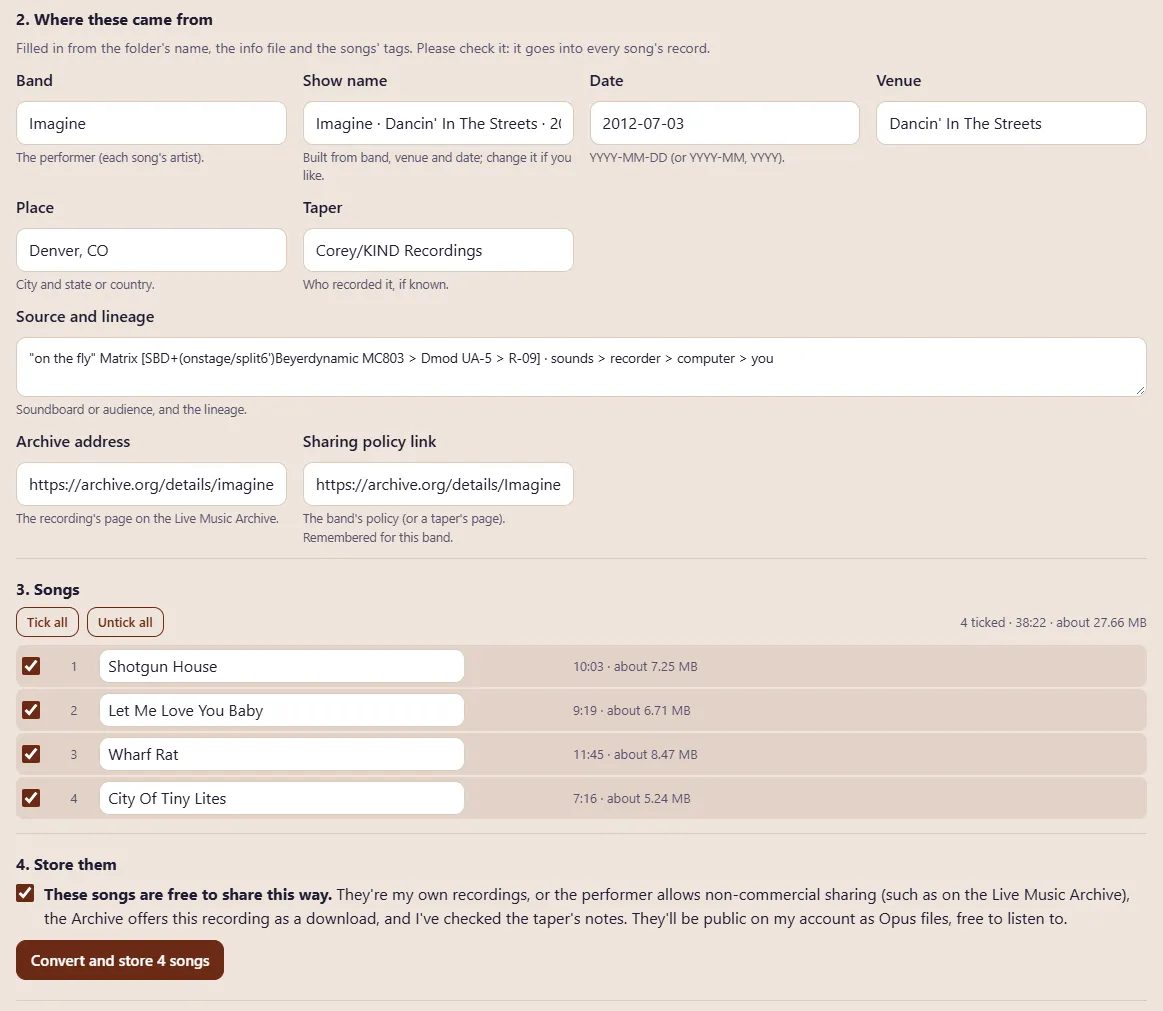
Then each song is converted in your browser and stored in your own account, one record per song, with its audio. Nothing goes through a server of mine.
The YMSB Fillmore show was the first. As FLAC it’s 851 MB; stored, it’s about 112 MB. Those are the same 26 songs at about an eighth of the size, which is what makes keeping whole shows in an account sensible.
For now the importer is switched on only for my own account, while I find out what real shows throw at it. If you’d like to try the importer now, get in touch. Before long it will be there for anyone using the Foundry, as one more way to bring songs in, alongside plyr.fm.
What the shows taught it
Real shows have thrown a few things at it already.
The missing info files. The Archive’s download zips often leave the info file out. Of the first five shows I imported, four came without it. The importer still worked from the tags and the folder name, but the taper, the lineage and the notes stayed empty until I downloaded the info file separately and picked the folder again. So now, when there’s no info .txt file, the importer says so, right under what it found, before you go any further.
Every song is number 1. Todd Snider’s 2005 set at Hardly Strictly Bluegrass came with files named like 1-07 …, disc 1, track 7. The importer read the “1” and stored every song as track 1. The songs were fine; only their order was lost. A small script put the numbers right in place, and the next Foundry release learned to read that kind of name.
Not every taper-friendly artist has their own collection. Molly Tuttle’s set at Ninigret Park, at the Rhythm & Roots festival in 2025, isn’t in a Live Music Archive band collection of her own. It came from the Archive’s Taper’s Section, which gathers recordings by taper-friendly artists who don’t have one, and the taper shares it on a trade-friendly tracker too. So before ticking the box, I checked. It’s a great recording, 2.2 GB of high-resolution FLAC, stored as 64 MB of songs.
By now the account holds 168 songs from ten shows, about 737 MB.
Making tapes
C60, C90 and C120
A tape can now be a C60, a C90 or a C120: 30, 45 or 60 minutes a side. The sides are strict, like a real cassette. When a side runs over, the tape won’t publish until you move a song. My first C90, Freaky Friday, came out at 45:36 on Side A. Moving one song across to Side B fixed it.
The “Burndown” name
Because of these Foundry updates, the previous name Mixtape C60 no longer fit. The new name, Mixtape Burndown, can represent a chart counting down the work left, as each side’s meter now counts the minutes left to fill (“3:18 to burn”). A burndown can also be thought of as a bonfire at the end of a festival night. And you can burn a mix for a friend.
Choose songs
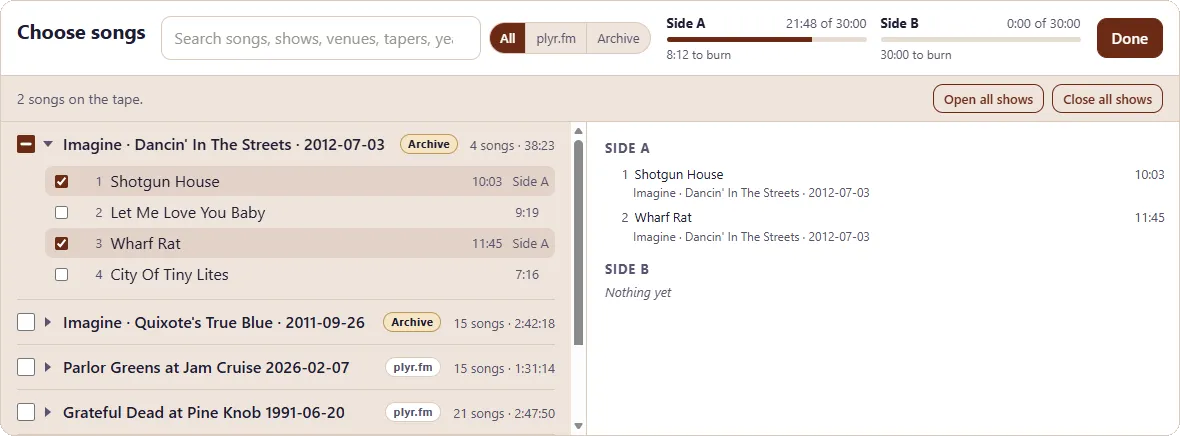
Songs are picked in a big Choose songs window. Shows are grouped, newest first, with Archive and plyr.fm side by side, each marked with a small label, and a filter to show one or the other. Search finds songs by name, and by the venue or place in a recording’s details: searching “denver” finds the Fillmore show. You can tick a whole show at once.
The tape desk
A column down the side shows the tape as it will be, Side A and Side B. Drag a song to move it, within a side or across to the other, or drag one in from the library. Widen the column to see each song’s show. Removed something by mistake? Undo puts it back.
What goes on the tape
A tape is one tile, and it carries its own copy of every song, as MP3. An Archive song is converted like any other. When a tape has Archive songs, the Foundry asks a broader question before publishing: that these are my own uploads or recordings, or come from artists who allow non-commercial sharing, and that the tape is free to listen to.
The J-card stays simple on purpose: the liner notes and the songs on each side. Each Archive song’s address, source and sharing policy go into the tape’s own data, and the full credits are left to Tracks, below.
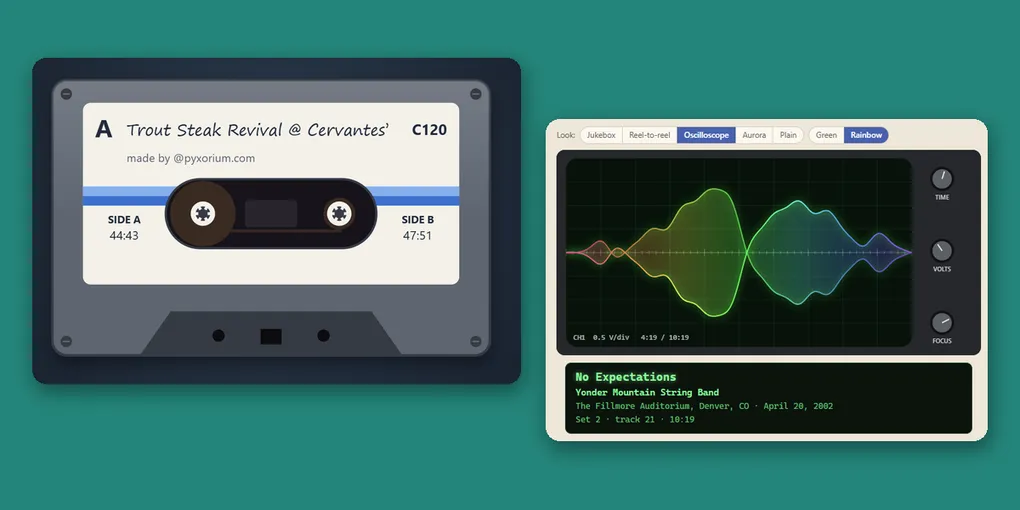
Try one: the Trout Steak Revival C120 in Raku, their whole show at Cervantes’ Masterpiece Ballroom in Denver, November 30, 2018, with Lindsay Lou and Bridget Law sitting in.
Listening
Tracks: one song at a time
Each imported song gets its own record, so it can be played on its own. In Raku, open a song’s address and it opens in Tracks, a tile that plays songs in the look you choose: a jukebox, a reel-to-reel deck, an oscilloscope, an aurora of light, or plain. Under it are the credits: the taper, the source, the show on the Live Music Archive, the band’s sharing policy, and who shared it. It plays songs uploaded through plyr.fm too.
Tracks is a renderer tile: Raku hands it the song’s record, and Tracks shows it. Nothing is downloaded until you press play; then Raku fetches the song straight from the account’s own server, and checks it’s the audio the record names.
The newest look, Aurora, has three worlds: Tide, Bloom and Prism. Aurora is inspired by Spectra, by Shimmer Math Labs, with our own drawing code.
A song in a post
A song can now be posted to Raku’s Tile posts, and played right in the post. Press Play here, and Tracks runs in the post’s own space, in a compact layout made for it: the picture fills it, with a strip along the bottom for playing. Expand gives it the whole window, and the song keeps playing.
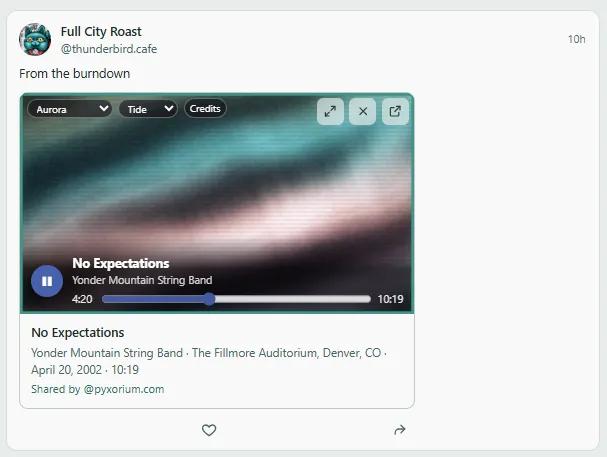
A song post points at two things: the song, and the Tracks that plays it. So it plays right in Tile posts, and hearts and the post’s own page work as for any tile post. To post a song of your own, open it in Raku and press Post.
Try it: the No Expectations post in Raku: press Play here, then ▶. It’s Yonder Mountain String Band at the Fillmore, the show this all started with.
Tapes on the phone: autoreverse
Tileman, the phone player app for tapes, now has autoreverse: Off stops at the end of each side, the way a real cassette does; Through plays Side A, flips, and plays Side B; Loop keeps going. Tileman joins the whole tape into one file on the phone, with a short gap and a soft click for the flip, so it keeps playing with the screen locked.
For builders
Two ideas carry most of the weight:
- Opus at 96 kbps. Songs are stored as Opus in a WebM file, made in the browser with WebCodecs. That’s how 851 MB of FLAC becomes about 112 MB that still sounds like the show.
- A record type of its own, with plyr.fm’s core fields. plyr.fm reads
fm.plyr.trackrecords written by any app, which is good interop, and it’s why Raku’s Tracks web tile plays plyr.fm songs so easily. For Mixtape Burndown, the idea was to include a customized focus on live recordings that would further encompass the concert date, the venue and set, the taper and lineage, the Archive address and the band’s sharing policy. So Archive songs arecafe.thunderbird.audio.trackrecords, which keep plyr.fm’s core fields and add a new section for the show. plyr.fm doesn’t pick them up, so they don’t appear on your plyr.fm page as uploads. In this design, Tracks reads bothcafe.thunderbird.audio.trackandfm.plyr.trackrecords. The lexicon is published from thunderbird.cafe and lives in the audio-tracks repo.
What’s next
Smaller tapes: an optional Opus setting for tapes, about a third smaller than MP3, once Tileman can join Opus sides smoothly. And a songs list in Raku, so you can browse an account’s songs show by show and play or post any of them.
Please support bands and venues that allow taping by buying merch and attending shows.
Links
- The Web Tile Foundry, and its code at pyxorium/web-tile-foundry
- Raku, and its code at pyxorium/raku
- Tracks’ code: pyxorium/renderer-tiles
- Tileman, the phone player app for tapes
- Mixtape C60: Your plyr.fm songs on a cassette Web Tile, the first Mixtape post
- Renderer tiles: showing atproto records inside Raku
- Tile posts: a tile you can play, right in the post
- Web Tiles, by Robin Berjon
- Tiles Protocol: Data Passing (tp-data), how Raku hands Tracks the song’s record
- The Live Music Archive, and its Taper’s Section
- Spectra, by Shimmer Math Labs, which inspired Aurora