Wishes, Continued: Shared View Between Two Web Tiles Via External Relay
The last post showed two Web Tiles cooperating through a wish: a die tile asked for a color scheme, and a creative designer tile granted it. The demo was limited, however, with regard to the cross-tile communication mechanism.
There, the relay passing messages between the two tiles lived in the page’s own memory, so it could only ever work inside a single browser tab. Real communication between tiles on different computers over the internet would take more, and this post takes a first step in that direction.
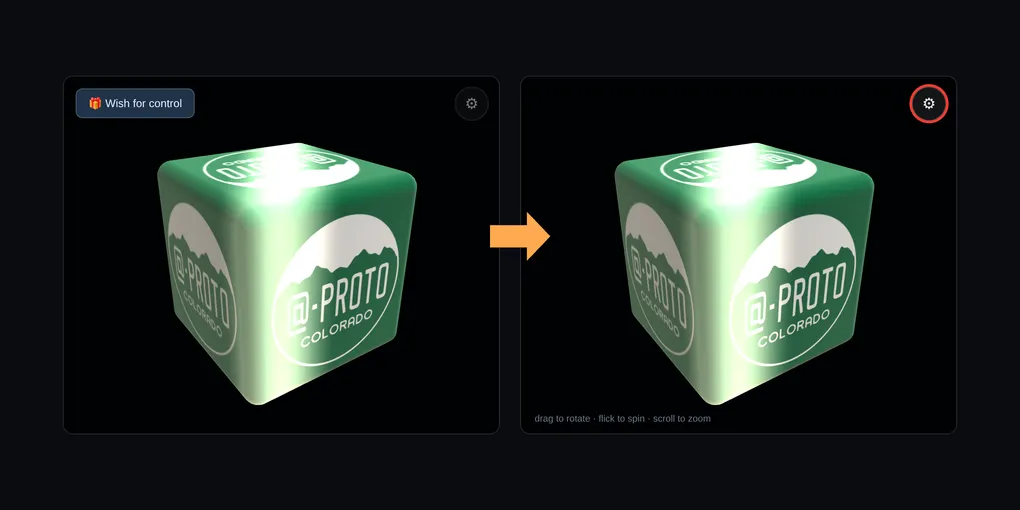
The demo below shares one rotating die between two Web Tiles. Both tiles draw the same die. At any moment only one of them holds control. The holder can turn the die, flick it so it keeps spinning, and zoom, and the other tile follows along. To take control, the other tile wishes for it, and the holder grants it. This time the messages do not stay inside the page. Now, they cross a small relay server on the internet and come back, so any lag you see between the tiles is real.
Loading the demo…
How to play. You operate both tiles, taking one turn at a time, the way you did in the last demo.
Bob’s tile starts out holding control, which you can tell by the red ring around its gear button. Drag the die and let go to flick it, and it keeps spinning until the holder touches it. Bob’s tile can also zoom in and out on the die, and with the gear icon settings panel, Bob’s tile has three color schemes to choose from.
At any time, Alice can click the “Wish for control” button on her own tile, and a blue arrow carries the wish to Bob.
When clicking on the “Grant control” button on Bob’s tile, an orange arrow carries the grant to Alice. As the wish is granted, a soft glow sweeps across both dice, and the red ring moves from Bob’s gear button to Alice’s.
Alice now holds control, and can choose a color scheme for the die, from her own unique set of three schemes in her settings panel.
Two more things in the demo are worth a try: the Try to phone home button in each tile’s gear panel, and the What the relay sees section under the tiles. Both are explained below.
What changed since last time
By design, a Web Tile is sandboxed within a secure container and is not allowed to open a network connection to the internet. This is one of the main points of a Web Tile.
Instead, the webpage does it on the tiles’ behalf. The page holds two connections to the external relay, one for each tile, and acts as a messenger for both: when a tile hands it a message, the page passes it up to the relay, and when the relay sends something down, the page hands it to the right tile. From a tile’s point of view, it is still only talking to the page that holds it.
The idea behind Web Tiles is that a page can host small web apps from sources it doesn’t control, because a tile can’t send data anywhere by itself. The relay here is that idea stretched across the internet.
Each connection is identified only by a random session number that the page makes up when it loads, and by a seat, Bob or Alice. The relay joins the two connections that share a session number and passes messages between them. When the two tiles are on your screen, the page also measures the round trip to the relay every few seconds, and shows it at the top right of the demo.
The two tiles are built from the same code and only make full sense as a pair. The wish that one tile sends the other, for control of the die, goes by the name cafe.thunderbird.wish.dieControl. Each tile is published as its own record, in two different PDS repositories: to inspect the actual ing.dasl.masl records, look at Bob’s tile record and Alice’s tile record.
A second difference is how the Web Tiles reach the page you see here. A web page is fetched over HTTP from a server at a web address, and the server sends whatever it chooses to send at that moment. Here, the page is given an at:// address naming a record in someone’s PDS repository. It asks that account’s PDS for the record using XRPC, the AT Protocol’s way of calling named methods over HTTP, and then fetches each of the tile’s files by its content address. The shape of the record is defined by a published lexicon, ing.dasl.masl. The external relay is a different matter. It isn’t XRPC, but rather a WebSocket carrying small messages, and the wish name cafe.thunderbird.wish.dieControl is informally styled like a lexicon name without having a published lexicon behind it yet.
What the relay sees
Everything one tile says to the other goes through that relay, so it is fair to ask what the relay can see. The What the relay sees section under the demo shows the real thing: a live table of every kind of message this page has sent to the relay and received from it, with the latest of each kind. All of it is numbers and colors, an angle, a zoom level, a handful of hex colors, never words. The relay is strict about that. Every message has to be one of a small set of shapes with exactly the right fields, at most 256 bytes, and at most 30 a second per connection, and the relay refuses anything else. The Try to send the relay a message button shows it: it opens a separate connection, sends a message with words in it, and then a valid message with one extra word added, and displays the relay’s refusal of each.
Many systems handle risk by asking: a pop-up wants to know whether to allow this site to use your camera, your location, or your files. The Web Tiles design deliberately avoids leaning on questions like that, on the grounds that relying on people to judge such requests has repeatedly failed in practice. Instead, it limits what a tile can do in the first place, so that its only way out, the page that holds it, is narrow. This demo adds one thing of its own: the panel above lets you watch everything that crosses.
Even so, that is not the same as the relay knowing nothing. It also sees your internet address, when each message arrives, and the random session number for this page load. As written, the relay program keeps everything in memory and writes a single line to its log, when it starts, and no message is ever logged. That is my description of a program I run, though, not something this page can prove to you, and the hosting service in front of it may keep its own connection records.
What keeps the tiles off the network
Each tile’s gear panel has a Try to phone home button. It makes the tile try three things: a fetch, an image load, and a WebSocket connection, all to example.com. The browser refuses all three, and the tile shows the refusals, read from the browser’s own report of which rule stopped each one. That rule is a content security policy, declared in the tile’s own page and enforced by the browser.
What this demo still isn’t
It is still one browser. You operate both tiles, in one tab. I have not built the version where each tile sits on a different person’s computer, which would need a page holding only one of them. The relay is built for that, but this page is not.
It is still open. The relay passes along any message of the right shape from anyone who joins with the right session number. There is no identity, no permission, and nothing deciding who is allowed to wish for what. That is the same open question the last post ended with, and this post does not claim to have solved it.
Scrolling pauses it. Browsers pause the animation of a frame from another site while it is scrolled out of view. If you scroll the tiles away and back, the holder’s die freezes until you return, and the other tile, if you can still see it, keeps turning at the last speed it was told and then snaps back.
Discoverability
In this demo, nothing had to be found. The page was handed the addresses of both tiles, and the address of the relay, ahead of time, and it loaded exactly those. Web Tiles won’t always have that luxury. A tile that wishes for something can’t know in advance which tile, if any, will grant it, so a page may need to go looking for candidates on its own. That is the discoverability piece, and this demo leaves it out.
This is the kind of thing the Web Tiles design anticipates: tiles that can call on one another without knowing in advance who will answer.
What might it look like? One possibility, on the AT Protocol: a tile’s publisher posts a small record that says, in effect, “the tile at this address grants this wish,” using a wish name like cafe.thunderbird.wish.dieControl. A page could then ask the network which accounts have published records of that kind, and show the candidates for the reader, or the page’s author, to choose among. Because a published Web Tile is content-addressed, the choice could also be checked: the page could confirm that the files it loads are exactly the ones the record points to, before any message passes between the tiles.
Finding tiles raises its own questions, mainly about whom to trust, since anyone can publish such a record. Discoverability across the AT Protocol atmosphere will be explored in a future post.
Sources:
- Web Tiles, by Robin Berjon
- DASL: Web Tiles specification
- DASL: Tiles Protocols
- The previous post: Wishes, Creating Two Web Tiles that Talk to Each Other
- W3C Web Intents (Working Group Note, 2013)
- @dasl/tiles, the monorepo covering
tile-loader,tile-server, andatile