Cosmic Junkyard: A Web Tile That Lets You Play Your Sprite
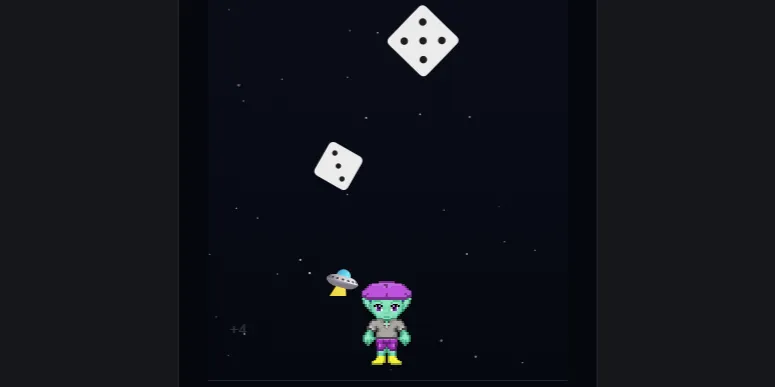
Cosmic Junkyard started life as a room in House Dice, in the Dice Lab. Dice fall out of the sky; you walk your character left and right to dodge them. Every die you dodge adds its pips to your score, every die that hits you takes them away, and the occasional flying saucer or alien is a bonus if you catch it. Everyone gets the same drops on the same day.
The character you play is your own RPG actor sprite, a little pixel-art person stored on your atproto account. This post is about getting that sprite into a version of the game that lives in a Web Tile, where by design it can’t go and fetch anything.
Loading the game…
Use the arrow keys, or hold the left or right half of the game on a phone. Tap Load my RPG actor sprite under the game to play as yourself. If you don’t have a sprite yet, you can make one at rpg.actor in a couple of minutes; until then you’ll play the default sprite as shown here.
The restriction: a tile can’t look anything up
A Web Tile is sealed. Everything it will ever use is bundled into its record when it’s published: its code, its images, its fonts. Once it’s running, it can’t reach the network at all. That’s what makes tiles safe to drop into any page, and every tile I’ve built so far carries everything it needs inside itself.
So the tile is limited, and by itself it can’t ask “who’s playing?” and then download their sprite. It doesn’t know who’s playing, and it has no way to ask the network even if it did.
The answer: this host web page downloads the sprite
Although the tile itself cannot get the sprite from an AT Protocol PDS repository, this web page has no such limits. It can fetch the sprite straight from your repo with XRPC calls, then hand it to the sandboxed tile. So the work is split:
- The tile shows a button “Load my RPG actor sprite”. When you tap it, the tile sends one small message to the page: please find me a sprite.
- The page opens a search box under the game. You type your handle, pick your account, and the page looks up your sprite record and downloads the image.
- The page sends the image back into the tile, along with the sprite sheet’s frame sizes, and the tile swaps it in.
The tile never touches the network. It asks, and the page answers.
This is a little different from the wishes in my earlier posts (color schemes and the shared die). A wish is one tile asking another tile for something, with the page only passing messages along. Here there’s no second tile at all. Searching for an account is something only the page can do, so the page does the whole job itself. This can be referred to as a host-native capability, to keep it separate from wishes. The difference matters most for trust:
- In a wish, the sandbox still protects you. Both tiles are sealed, so whatever passes between them stays inside tiles that can’t reach the network. The page only relays messages. The open question is whether each tile should believe what the other one sends, which is why a tile checks anything it receives before using it.
- In a host-native capability, your input leaves the sandbox. The handle you type goes to the page, not the tile, and the page can talk to the network: here, to a typeahead search service, Bluesky’s handle resolver and your account’s server. So you’re trusting the page and the services it calls, not just a sealed tile. That’s a comfortable trade here, since everything involved is public (your handle and your sprite are both public atproto data), but it’s why the notes below spell out exactly where your typing goes.
The tile still keeps its own guard up: if the page sent it something that isn’t a usable sprite sheet, it would simply keep the character it already has.
Sealed code, fresh data
An important benefit of the web tile is maintained: the tile’s code is permanent. It was published once and can’t change. But the sprite it draws arrives fresh every time, from whoever is playing. The code is fixed; the data it works on isn’t.
The flip side is that your sprite only lasts for that visit. Reload the page and you’re back to the default character until you load yours again.
A few honest notes
- The search goes through a third-party service. Handle search powered by typeahead.waow.tech. As you type, each keystroke is sent to that community-run service to suggest matching accounts. The sprite lookup itself then goes to Bluesky’s handle resolver and to your own account’s server.
- No saved scores. A tile can’t write to your account, so this version is free play: no daily record, no streak, no share button. The House Dice room is where scores count.
- Embedded elsewhere, the button stays hidden. In the Web Tiles Gallery, or any page that doesn’t run the search, nobody answers the tile’s first hello, so it simply doesn’t offer the button. The game still plays with the default character.
Under the hood
The House Dice room is built on p5.js. For the tile I rewrote it against the browser’s own canvas drawing, so the whole thing is one HTML file and one small sprite image, with no libraries. Same game, same daily drops, same falling dice.